Cricfy TV for PC
Want the match on a bigger screen? There is no separate desktop app, but you can run the free Cricfy TV APK on any Windows PC or Mac using a lightweight Android emulator. Here is exactly how.
Get the APKRun Cricfy TV on a laptop in 5 steps
- 1Install a free Android emulator such as BlueStacks or LDPlayer on your PC.
- 2Open the emulator and sign in with a Google account when it asks.
- 3Download the Cricfy TV APK from the Download page in the emulator’s browser.
- 4Open the APK inside the emulator (drag-and-drop also works) and install it.
- 5Launch Cricfy TV, pick a match, choose a server and watch on the big screen.
A laptop’s steadier connection and hardware usually mean smoother, buffer-free playback than a phone — great for long matches.
Cricfy TV on every screen
Phone, tablet, big-screen TV or desktop — here is exactly how to get Cricfy TV running on each one.
Cricfy TV for Android (Phone & Tablet)
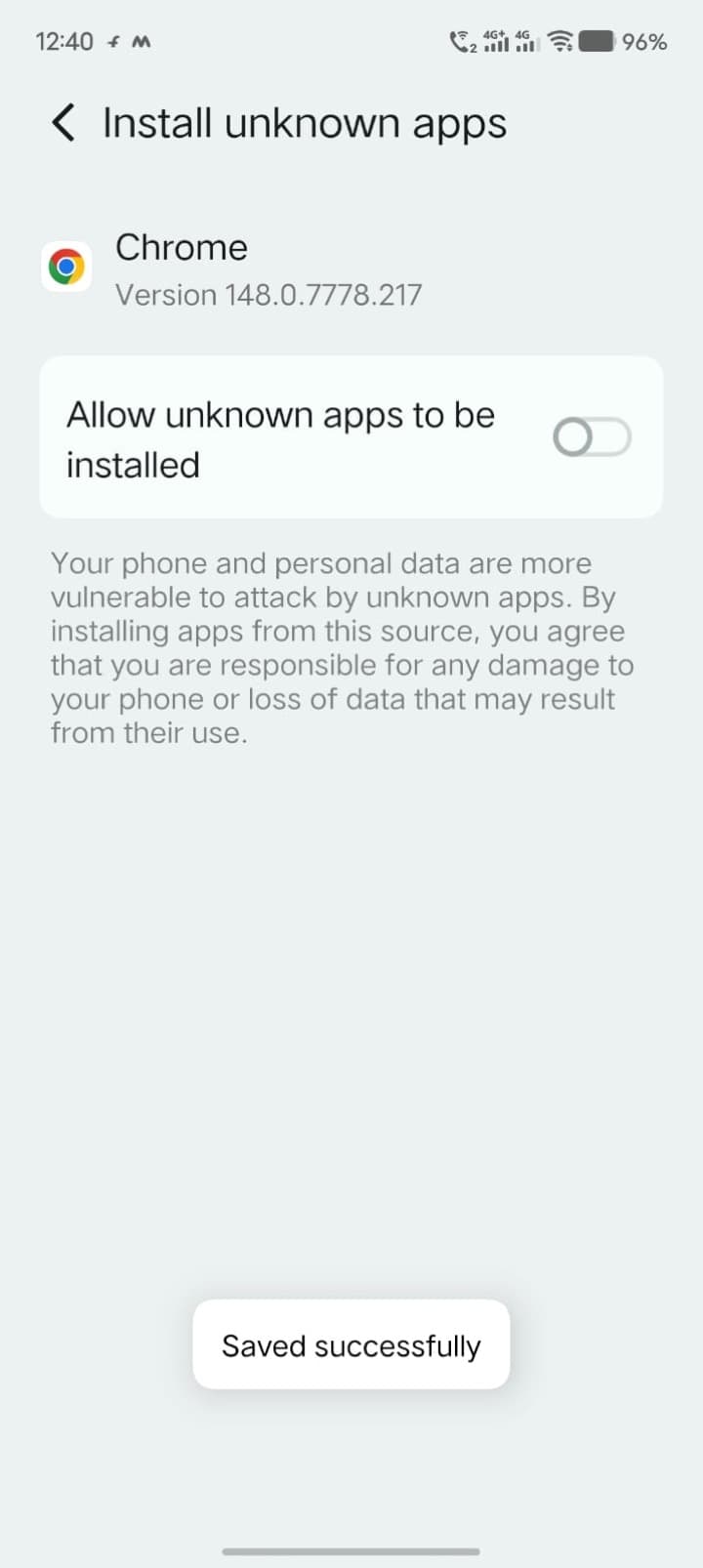
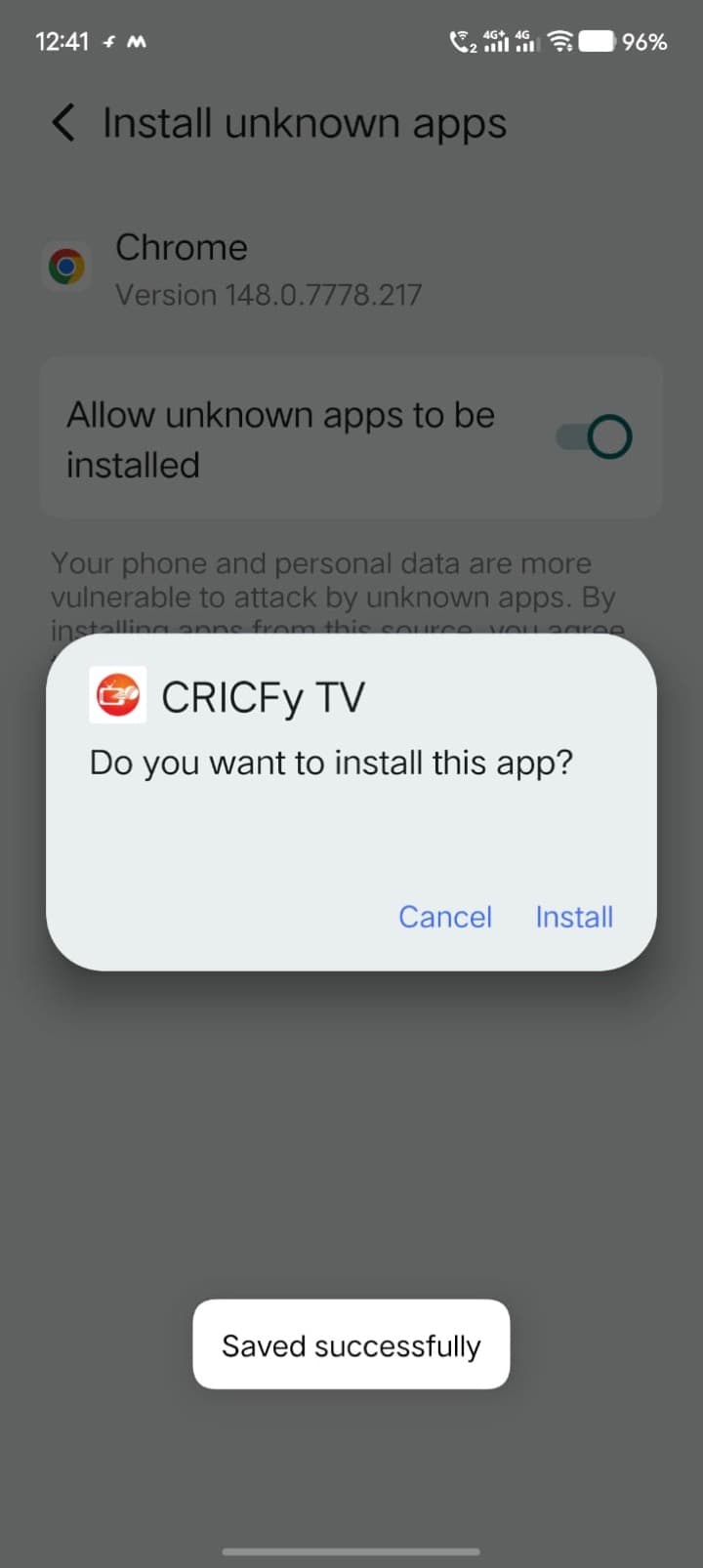
This is the main, fully-supported version. Turn on “Install unknown apps” for your browser, download the APK, and tap install. The whole thing takes less than a minute.
- 1Allow unknown sources
- 2Download the APK
- 3Tap install & open
Cricfy TV for Android TV & Fire Stick
Watch on the big screen. Use the free Downloader app (or a USB drive) to put the same APK onto your Android TV, Google TV or Amazon Fire Stick, then open and enjoy.
- 1Open Downloader app
- 2Enter the APK link
- 3Install & launch on TV
Cricfy TV for PC (Windows & Laptop)
There is no separate desktop app, but you can still run Cricfy TV on a PC or laptop using a free Android emulator like BlueStacks or LDPlayer — same app, bigger screen.
- 1Install an Android emulator
- 2Load the Cricfy APK
- 3Sign-in-free — just play
Cricfy TV for iOS (iPhone & iPad)
Cricfy TV is Android-only — there is no official iPhone app. iOS users can still follow live scores in Safari, or cast from an Android device to watch on a bigger screen.
- 1No APK on iOS
- 2Use the web for scores
- 3Cast from an Android device
Install Cricfy TV in under a minute
Cricfy TV installs just like any APK. Four quick steps and you are watching live cricket — it works the same way on phones, tablets and Android TV / Fire Stick.
- 01
Allow Unknown Sources
Open Settings → Security (or Apps → Special access) and enable “Install unknown apps” for your browser. This lets Android install the APK.
- 02
Download the APK
Tap the Download Cricfy APK button on this page and wait a few seconds for the 17 MB file to finish saving.
- 03
Open & Install
Open the downloaded file from your notification tray or Downloads folder and tap Install. It takes only a moment.
- 04
Launch & Watch
Open Cricfy TV, pick a live match or channel, choose a server and enjoy free HD streaming — no sign-up needed.
Installing apps from outside the Play Store carries the usual sideloading risk — only download Cricfy TV from a source you trust, and keep your device’s built-in security enabled.
Ready for live cricket on Cricfy TV?
Download Cricfy TV and stream every live match in HD — free, no sign-up, no subscription.
Download Cricfy APK — Freev6.8 · 17 MB · Android 5.0+